e-LAS Software for Drone LiDAR
The e-LAS software combines performance, speed and ease of use. The goal of e-LAS is to achieve the best possible relative and absolute accuracy with the selected sensor configuration. Its optimized algorithms offer unbeatable processing speeds. In minutes, you can obtain your calibrated, aligned, adjusted, colorized and georeferenced point cloud (LAS). Use the high performance of your INS to precisely geolocate aerial images and subsequently use them in photogrammetry software.
New in version 3.0
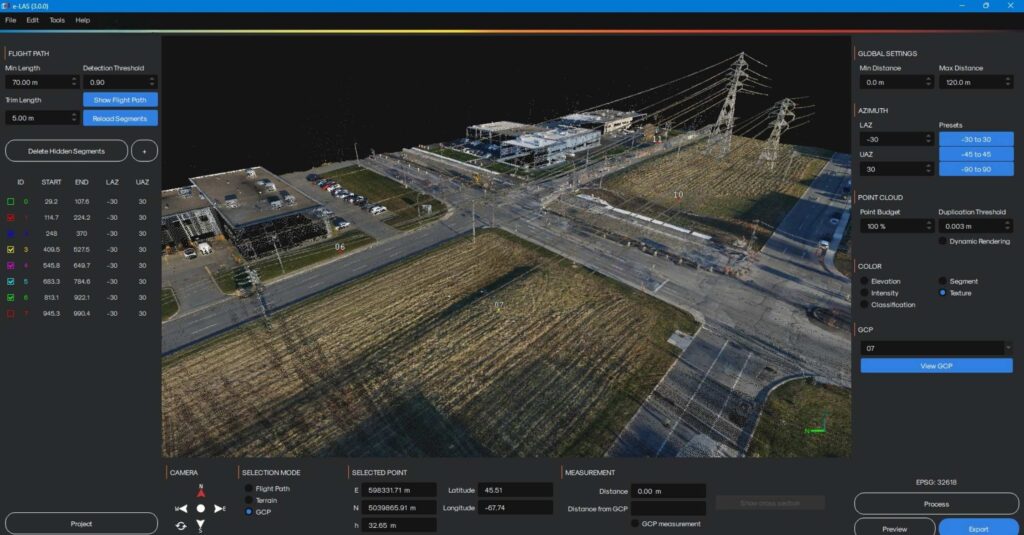
- Redesigned interface for more efficient work
- Camera orientation via predefined multi-axis views
- Integrated compass (North/East) for better spatial orientation
- Faster display and smoother navigation, even on large projects
- More powerful visualization and analysis tools
- Improved cross-section tool with integrated measurements
- Display of Ground Control Point (GCP) identifiers within the point cloud
- Interactive selection of GCPs with coordinates visualization (X, Y, Z)
- Three new point cloud coloring options for enhanced data interpretation
- Enhanced LiDAR accuracy for more reliable results
- New advanced LiDAR strip adjustment and alignment algorithm
- Processing possible directly from LAS files
- Requires trajectory file
- Improved tie matching algorithm for more stable data correspondence
- New recalibration option using control points along X, Y, and Z axes
- Improved georeferencing at export for better deliverable consistency
- New advanced LiDAR strip adjustment and alignment algorithm
- Smarter, automated processing workflow
- Stand-alone recalibration process after LiDAR or camera module change
- Ability to process and adjust data directly from LAS files
- Flexible LAS export: per individual strip or as a single consolidated project
- Improved imagery to enhance point clouds
- A new deblurring algorithm for sharper point cloud colorization
- Overall improvement in point cloud colorization quality derived from images.
Version 2.0
- Improved user interface
- Strip line adjustment
- Importing checkpoints
- Optimized code for higher processing speed
- Manual adjustment of camera calibration values
- RMSE calculation and export of precision report
- Adjustment on selected targets
Main functionnalities
Boresight angle calibration
Strip line adjustment
Point cloud colorization
Tie matching
Camera calibration adjustment
Visualization tool (Elevation, intensity, flight lines, texture)
Automatic flight trajectory segmentation
Real-time geographic measurement tools
Geotagging of images
Ground control point import
RMSE report
Point sampling for quick validation